Muse AI · Community invite board
Share Muse AI invite codes
Use a code below to pocket 1 billion free Muse tokens — or post your own and earn another billion every time someone redeems it. Community votes push the codes that still work to the top.
1 live codes · How to redeem a code →
1 Invite Codes
Ranked by freshness and community votes. Votes are self-reported, not verified redemptions.
8IXXSK
- No codes yet — be the first to share one.
Got a code? See what Muse can do.
A code unlocks 1 billion free tokens. These three guides show where to spend them.
What Muse can do
31 practical ideas for Meta’s personal AI agent, each with a request you can copy word for word.
Browse the ideas →Muse connectors
The apps and services Muse can plug into — mail, calendar, shops, music and more — and what each link-up is good for.
See the connectors →Muse prompts
Copy-ready image and video prompts for Muse Image and Muse Video, with notes on what each one makes.
Get the prompts →Questions about invite codes
- Create your Muse account at muse.ai (or in the Muse app).
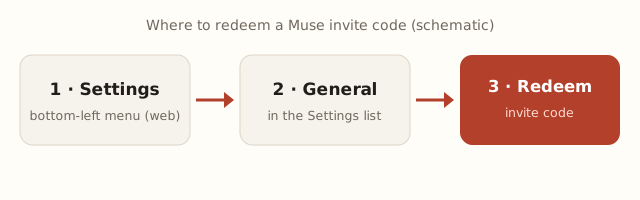
- Within 48 hours of signing up, open Settings → General → Redeem invite code. On the web, Settings sits in the menu at the bottom-left; in the iPhone app the entry is called “Redeem referral code”.
- Paste a 6-character code from the board above and confirm. You and the person who shared it each receive 1 billion Muse tokens.
Then come back and tap “Works” on the code you used, so the next person knows it is still good.
- It is used up. Every code can only be redeemed a limited number of times (currently 30), so busy codes run dry quickly. Grab one near the top of the board or one shared in the last few minutes.
- Your 48 hours ran out. A code can only be redeemed within 48 hours of creating your account, and the window cannot be reopened.
- Muse has not launched in your region. Muse is currently open in the US, Canada, Japan, Singapore and Mexico; an invite code cannot unlock a region that is still closed.
- A character was mistyped. Codes are easy to misread (0 vs O, 1 vs I). Use the Copy button instead of typing by hand.
If a code fails because it is used up, tap “Doesn’t work” — codes with many down-votes disappear from the board automatically.
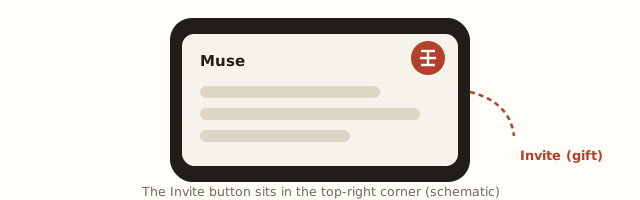
- Once you have a Muse account, tap the Invite (gift) button in the top-right corner of the app to see your personal code.
- Every time someone redeems it, another 1 billion Muse tokens lands in your account.
Share it with the form on this page so people who need a code can find yours.
- Freshness first, votes second. New codes start at the top. Votes nudge a code up or down by a limited amount, so a pile of votes cannot keep an old code pinned forever. Each code can only be redeemed a limited number of times (currently 30).
- Bad codes sink. Codes that collect many “doesn’t work” votes are hidden automatically.
- One vote per person per code. Tap the same button again to undo your vote. Voting is rate-limited per visitor and network, and votes are self-reported — they are not checked against Muse.
- Guarded submissions. Every new code passes a quick human check and per-network rate limits before it appears.